



Introduction
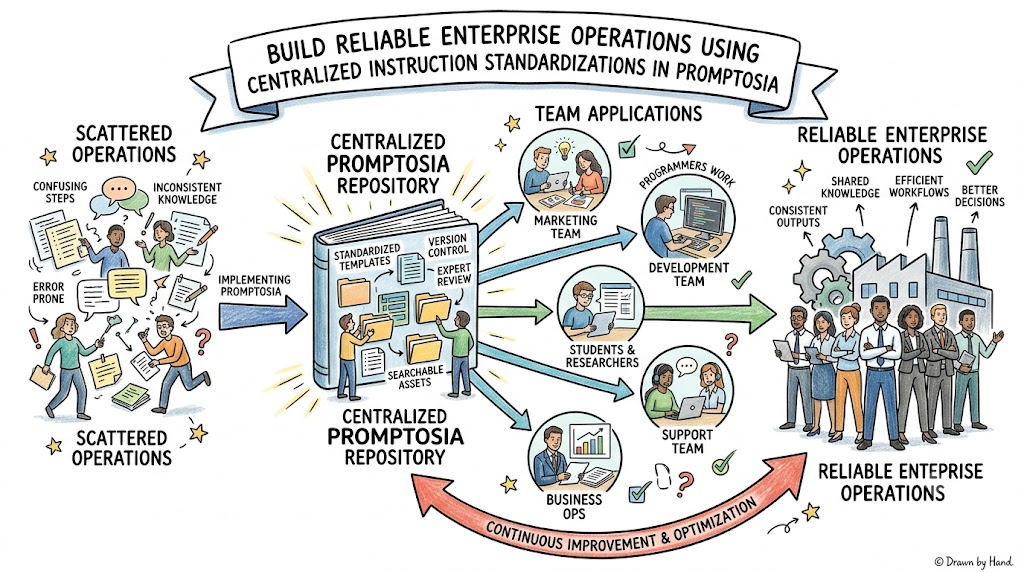
Finding a brilliant set of instructions that triggers the exact output you need from artificial intelligence feels like a major victory, yet keeping track of those instructions remains an ongoing challenge. Most people scatter their best instructions across endless chat histories, personal note apps, temporary text documents, email drafts, and multiple browser tabs. Consequently, when you need that precise formula a week later, you end up wasting valuable time searching through chaos or rewriting the prompt from scratch. This repetitive cycle leads to inconsistent results, lost productivity, and constant frustration. Fortunately, adopting a structured system like Promptosia offers a practical way to capture, organize, and systematically refine your instructions so they remain accessible whenever you need them.
Why AI Prompt Management Matters
Treating your instructions as valuable digital assets changes how efficiently you work with modern technology. When you rely on memory or scattered notes, minor variations in phrasing can alter tone, structure, and factual accuracy. In contrast, establishing a centralized repository ensures that your successful instructions deliver consistent, high-quality outcomes every single time. Moreover, organizing these resources eliminates time spent recreating effective queries, allowing you to focus on high-level execution rather than repetitive troubleshooting. Ultimately, systematic control transforms isolated trial-and-error moments into a reliable workflow that significantly boosts overall daily productivity.
What is Promptosia?
Promptosia was developed to address the growing friction of losing effective instructions across fragmented tools and digital spaces. Designed for creators, researchers, developers, and professionals, it provides a dedicated environment to store, evaluate, and share high-performing queries. Instead of treating interactions as disposable text snippets, this platform encourages users to treat their queries as continuously evolving resources. By offering systematic categorization, real-time feedback, and collaborative features, it helps individuals and teams turn temporary conversations into long-term intellectual property that simplifies complex daily tasks.
Understanding an AI Prompt Library
An organized repository functions much like a digital filing cabinet designed specifically for structured instructions. Rather than scrolling through endless history logs, users can categorize their queries using intuitive tags, thematic folders, and dynamic variables. These variables allow you to insert custom parameters into a standardized template without altering the core structure of the query. Powerful searchability ensures that you locate the exact template required within seconds, eliminating unnecessary clutter. Consequently, maintaining a well-curated collection turns isolated wins into a repeatable system that elevates work quality across diverse projects.
AI Prompt Organizer
An intuitive organization system prevents duplicated effort and mental overload by bringing logical order to growing prompt collections. By grouping items into distinct categories, applying custom tags, and organizing entries by project or domain, users avoid accumulating random, unlabelled text files. Furthermore, this structured environment allows you to store specialized collections for coding, content creation, administrative tasks, and analytical research in dedicated spaces. As a result, you no longer need to remember exact phrasing or search through scattered notes, ensuring every effective instruction remains immediately accessible for future tasks.
AI Prompt Optimizer
Transforming a rough, quick thought into a clear, highly effective instruction requires deliberate structure and precise language. An optimization tool analyzes your initial draft and automatically adds missing context, clear formatting constraints, and well-defined output parameters. Instead of settling for vague or ambiguous responses, this enhancement process ensures that the target system receives explicit guidance regarding tone, length, and goal. Consequently, turning incomplete ideas into polished, reusable assets minimizes back-and-forth revisions, saving time while drastically improving response quality across all your routine tasks.
AI Prompt Analyzer
Understanding the structural components of an instruction is essential for predicting how effectively an artificial intelligence model will respond. An analysis tool breaks down a query into core elements, including primary goals, variable placeholders, target audience, tone of voice, expected format, and safety considerations. By evaluating these key factors, you gain immediate insight into whether your query contains enough contextual clarity or if it lacks essential detail. This analytical approach helps you identify hidden gaps before running a task, ensuring every instruction is thoroughly prepared for consistent, high-performing execution.
Prompt Quality Checker
Evaluating overall quality before executing a query prevents frustrating errors and inconsistent outputs. A specialized quality checker measures essential criteria such as clarity, contextual depth, output formatting requirements, and general reusability. By generating a clear quality score alongside actionable recommendations, it highlights weak phrasing, missing guidelines, or vague directives that might confuse the model. This step-by-step feedback empowers you to refine your instructions prior to deployment, ensuring that your inputs consistently yield accurate, structured, and practical outputs tailored to your exact expectations.
Prompt Version Control
Refining instructions is an iterative process, and losing a previously successful iteration due to accidental overwrites can derail progress. Incorporating version control allows you to save incremental updates, track changes over time, and compare how adjustments affect overall performance. If a new edit produces unexpected or low-quality results, you can easily revert to a previous, proven baseline. This historical tracking fosters creative experimentation without risk, enabling you to continuously optimize phrasing, add complex parameters, and build highly refined assets while keeping past successes completely intact.
AI Prompt Testing
Before deploying an instruction for critical business tasks, academic research, or software development, testing its performance is vital. Running systematic tests allows you to compare different phrasing choices, structural variations, and variable settings against identical requirements. By directly contrasting the resulting outputs, you quickly uncover how minor changes in syntax or tone influence accuracy and formatting. This rigorous evaluation phase eliminates guesswork, giving you complete confidence that your finalized template will perform reliably across various real-world scenarios and diverse execution environments.
Reusable AI Prompt Templates
Relying on standardized templates eliminates the need to reinvent complex instructions every time a familiar task arises. By creating adaptable frameworks with customizable variables, you establish a consistent standard for recurring assignments like email summaries, code reviews, or blog outlines. Standardization ensures that every team member or individual achieves uniform quality regardless of who executes the task. Ultimately, building a library of reusable frameworks reduces cognitive strain, speeds up routine operations, and establishes a reliable baseline for long-term productivity across all digital projects.
Step-by-Step Guide to Managing AI Prompts
Identify Repetitive Tasks
Begin by auditing your daily workflow to pinpoint tasks where you repeatedly ask for similar assistance, such as summarizing articles, formatting data, or drafting client responses.
Draft the Initial Prompt
Write out a complete baseline instruction capturing the primary objective, necessary background context, required output format, and desired tone without worrying about initial perfection.
Optimize the Phrasing
Review your rough draft to eliminate ambiguous words, specify constraints, insert variable placeholders, and ensure the instruction clearly communicates expectations.
Categorize and Tag
Assign the refined instruction to a designated folder or category while adding descriptive tags to ensure effortless searchability and logical grouping within your collection.
Store Reusable Versions
Save the finalized template inside your centralized repository, ensuring that key variables are clearly marked so anyone can quickly customize the input for new scenarios.
Conduct Controlled Tests
Run the saved instruction across multiple scenarios or testing setups to evaluate how accurately the generated outputs align with your original project goals.
Compare Generated Outputs
Analyze the subtle differences in tone, structure, and detail produced by different query variations to determine which phrasing yields the most effective response.
Refine and Version
Update the instruction based on test findings, logging the new iteration into version control so you preserve historical improvements while constantly enhancing baseline performance.
Who Can Benefit?
Writers
- Overcome creative block by organizing structured brainstorming queries.
- Maintain consistent narrative tone across lengthy chapters and articles.
- Eliminate repetitive setup time when outlining new creative projects.
Bloggers
- Standardize research routines and article outline frameworks effortlessly.
- Generate optimized meta descriptions and headlines using saved templates.
- Streamline content repurposing workflows across multiple publishing channels.
Developers
- Store complex code explanation and debugging queries in one place.
- Standardize documentation generation templates across development teams.
- Retain precise syntax requirements for automated code refactoring tasks.
Students
- Organize study guide queries and complex concept simplification prompts.
- Build reusable frameworks for proofreading essays and academic papers.
- Maintain structured research summaries across different academic subjects.
Researchers
- Standardize data extraction and source synthesis instructions easily.
- Maintain strict analytical criteria across extensive literature reviews.
- Organize domain-specific queries to ensure repeatable, objective findings.
Educators
- Create reusable lesson plan generation frameworks and grading rubrics.
- Standardize assignment feedback templates to maintain grading consistency.
- Organize interactive classroom discussion queries for quick daily access.
Digital Marketers
- Maintain brand voice guidelines across all marketing copy templates.
- Organize campaign generation queries for social media and email.
- Rapidly iterate on ad copy variations using structured testing setups.
Businesses
- Standardize customer support responses and operational report queries.
- Ensure company-wide alignment on communication tones and standards.
- Reduce onboarding time by providing new hires with ready-to-use prompt libraries.
Content Creators
- Organize video script outlines and social caption templates logically.
- Rapidly generate topic ideas using structured brainstorming frameworks.
- Maintain consistent branding across multiple content platforms.
Teams
- Eliminate redundant prompt creation by sharing centralized team libraries.
- Collaborate on refining complex workflows through shared version histories.
- Ensure consistent output quality across cross-functional department projects.
Real-Life Scenarios
Technical Documentation Refinement
- Problem: A software development team spent hours drafting manual API documentation, leading to inconsistent formatting and missing endpoint descriptions across different product features.
- Practical Approach: The lead developer created a structured documentation query with fixed variables for endpoint parameters, optimized the wording for technical clarity, and saved it in a shared workspace.
- Outcome: Team members produced uniform, highly accurate API documentation in minutes, saving dozens of hours while maintaining strict engineering standards.
Customer Support Response Standardization
- Problem: A growing e-commerce business faced rising customer inquiries, resulting in varied support response tones, inaccurate policy statements, and delayed resolution times.
- Practical Approach: The support manager built a library of categorized response templates incorporating variables for order numbers and customer names, testing each variation for tone and clarity.
- Outcome: Response times dropped significantly while customer satisfaction scores rose due to clear, empathetic, and accurate policy communications.
Academic Literature Summarization
- Problem: A research fellow felt overwhelmed analyzing hundreds of academic papers, struggling to maintain consistent summary formats across different study topics.
- Practical Approach: The researcher developed a specialized analytical query designed to extract methodology, key findings, and limitations, organizing the template with tags for quick retrieval.
- Outcome: Literature reviews were completed twice as fast, resulting in structured, highly comparable summary notes that simplified final paper synthesis.
Marketing Email Campaign Generation
- Problem: A digital marketing agency struggled to maintain distinct brand voices across multiple client promotional emails, leading to generic copy and poor click-through rates.
- Practical Approach: The agency created customized email generation frameworks tailored to each client’s unique brand guidelines, storing them as reusable assets with version control tracking.
- Outcome: Campaign setup times were cut in half while click-through rates improved thanks to highly targeted, on-brand promotional messaging.
Weekly Executive Status Reporting
- Problem: A department director spent every Friday afternoon gathering raw activity notes and manually reformatting them into executive status updates.
- Practical Approach: The director set up a status report template that automatically parsed bulleted accomplishments into a polished, professional executive summary with clear action items.
- Outcome: Weekly reporting effort was reduced from two hours to ten minutes, providing leadership with consistent, actionable operational updates.
Common Mistakes to Avoid
Saving Prompts Randomly
Storing instructions across sticky notes, random text documents, and scattered chat windows creates digital chaos that defeats the purpose of organization. Establishing a single, dedicated repository ensures every valuable asset remains instantly searchable and organized.
Rewriting Prompts Repeatedly
Attempting to recreate effective queries from memory wastes significant time and introduces subtle errors that degrade output quality. Saving proven instructions as permanent templates eliminates unnecessary rework and guarantees consistent results.
Ignoring Version History
Overwriting a successful query with untested modifications risks losing a high-performing instruction forever. Maintaining clear version control allows you to experiment freely while safeguarding past iterations for easy retrieval whenever needed.
Using Vague Instructions
Failing to specify context, output expectations, or target audience constraints leads to weak, generic responses. Taking time to optimize phrasing with explicit guidelines drastically improves accuracy and overall response value.
Not Testing Prompts
Deploying queries without testing their behavior across different scenarios often results in unexpected errors or formatting glitches. Systematic testing ensures your assets deliver reliable performance before integrating them into crucial workflows.
Mixing Unrelated Prompts Together
Combining multiple unrelated objectives into a single massive query confuses the underlying model and degrades performance. Keeping queries focused on clear, single-purpose goals yields far better control and higher-quality outcomes.
Ignoring Prompt Quality
Assuming any basic text input will produce optimal results leads to inconsistent, frustrating experiences. Utilizing quality evaluation techniques helps identify missing variables and structural gaps before execution.
Forgetting Context
Omitting critical background information forces the system to make assumptions, often resulting in off-target outputs. Providing well-defined background context ensures generated responses align precisely with your intended project goals.
Keeping Prompts Disorganized
Accumulating dozens of unlabelled templates without folders, tags, or categories makes finding the right resource frustratingly slow. Regular organization ensures your collection remains clean, efficient, and effortless to navigate.
AI Prompt Management Features and Their Purpose
| Feature | Why It Matters | Practical Benefit |
| Centralized Library | Eliminates scattered notes by housing all queries in a single secure environment. | Reduces search time and prevents accidental loss of proven instructions. |
| Categorization & Tagging | Allows quick filtering by topic, project, or function. | Keeps large template collections neatly organized and instantly accessible. |
| Variable Placeholders | Enables static templates to adapt to new inputs without altering core structure. | Standardizes recurring tasks while accommodating unique project details. |
| Optimization Tools | Enhances rough drafts into clear, structured instructions automatically. | Improves output accuracy and saves time spent manual editing. |
| Version Tracking | Preserves historical iterations to safeguard past successful phrasing. | Allows safe experimentation without risking the loss of baseline templates. |
| Comparative Testing | Enables side-by-side evaluation of different query iterations. | Identifies the most effective phrasing prior to official deployment. |
Characteristics of a High-Quality AI Prompt
| Factor | Why It Is Important | Practical Tip |
| Clear Objective | Prevents off-topic responses by defining the exact goal. | State the precise action required using strong, active verbs. |
| Rich Context | Gives necessary background so the output fits the situation. | Include relevant constraints, user personas, and background facts. |
| Defined Output Format | Ensures generated content matches technical or layout needs. | Explicitly request bullet points, JSON, tables, or word count limits. |
| Tone Specification | Align communication style with target audience expectations. | State whether tone should be formal, conversational, technical, or persuasive. |
| Dynamic Variables | Keeps templates versatile across multiple similar assignments. | Use clear bracketed placeholders like [Insert Topic] for flexible editing. |
| Safety & Constraints | Prevents harmful, irrelevant, or hallucinatory content generation. | Define explicit boundaries on what topics or terms to avoid. |
Benefits of Managing AI Prompts
- Saves Time: Quickly access pre-built, tested templates instead of writing queries from scratch.
- Improves Consistency: Achieve uniform formatting, tone, and quality across all generated outputs.
- Reduces Repeated Work: Eliminate the need to rediscover effective phrasing for routine daily tasks.
- Makes Collaboration Easier: Share standardized team libraries to keep everyone aligned on best practices.
- Encourages Prompt Reuse: Turn one-off successful queries into lasting digital assets for future projects.
- Improves Organization: Maintain clean, tagged collections that simplify long-term project management.
- Supports Continuous Improvement: Systematically refine phrasing over time using version control and testing.
FAQ Section
1. What is a prompt management tool for AI?
An AI prompt management tool is a dedicated platform or software application that helps users save, organize, refine, test, and share their artificial intelligence instructions in a centralized repository rather than losing them across chat histories.
2. How does an AI prompt library improve daily productivity?
An AI prompt library stores pre-tested, high-quality templates that can be retrieved instantly, saving users from wasting time rewriting queries, correcting formatting errors, or searching through scattered notes for past instructions.
3. Why are variable placeholders important in prompt templates?
Variable placeholders allow a single standardized template to be reused across different projects by simply filling in specific details, maintaining structural consistency while catering to unique task inputs.
4. What is the difference between an organizer and an optimizer?
An organizer focuses on categorizing, tagging, and structuring stored templates for easy access, whereas an optimizer focuses on enhancing the phrasing, clarity, and formatting of a query to produce better AI results.
5. How does version control help when refining prompt instructions?
Version control saves historical iterations of a query, allowing users to experiment with new phrasing without fear of losing a previously successful baseline instruction if the new edits yield poor results.
6. Can teams collaborate using a centralized prompt library?
Yes, centralized libraries enable team members to share high-performing templates, maintain consistent brand guidelines, eliminate redundant query creation, and streamline cross-functional workflows across the entire organization.
7. Why should I test my prompts before using them for work?
Testing queries across multiple scenarios allows you to spot unexpected formatting errors, vague responses, or off-topic outputs early, ensuring your final template performs reliably when applied to critical tasks.
8. Is prompt management useful for non-technical users?
Absolutely; writers, marketers, educators, and business professionals benefit greatly from organizing their routine communication, content creation, and research queries into structured, easily accessible templates.
9. How do tags and categories help in managing prompt collections?
Tags and categories group templates logically by subject, project, or task type, making it effortless to search, filter, and locate specific instructions within large and growing digital collections.
10. What constitutes a high quality prompt instruction?
A high-quality instruction features a clear objective, rich background context, explicit output formatting constraints, dynamic variable placeholders, and specified tone guidelines to ensure accurate and repeatable results.
Conclusion
Managing artificial intelligence queries systematically is no longer an optional convenience—it is a fundamental practice for anyone seeking consistent, high-quality digital outcomes. Leaving valuable instructions scattered across chat histories and note apps wastes time, causes inconsistent performance, and forces you to repeatedly solve the same problems. By establishing an organized collection, utilizing variable templates, and leveraging version control, you transform temporary interactions into enduring productivity assets. Systems like Promptosia provide the structured framework needed to refine, store, and evaluate your queries effectively. Taking control of your instructions today will streamline your daily operations, eliminate unnecessary rework, and unlock the full potential of your artificial intelligence tools.

Leave a Reply
You must be logged in to post a comment.