



Introduction
Launching a software engineering career feels much simpler with reliable guidance like DevOpsSchool.org. A DevOps roadmap gives newcomers an organized path to master every key topic. You discover how coding teams and server operations crews unite as partners. Without a solid study plan, you might feel lost among hundreds of technical tools. This beginner guide outlines the exact sequence for learning modern engineering disciplines today. You will build core command-line habits before tackling complex automated pipelines and cloud networks.
What Is a DevOps Roadmap?
Software creators write application code, while IT operators keep web servers online. DevOps unites these separate groups so they deliver customer updates without messy delays. A DevOps roadmap functions like a clear city map for your career. It outlines the specific capabilities you must master in an easy order. Beginners often waste precious months memorizing dozens of trendy command-line programs at once. Smart students focus on core ideas like networking, automation, and computer storage first. Once you master the fundamentals, learning any brand-new utility takes only days.
A Simple DevOps Learning Path
Every successful journey begins with foundational operating system skills. First, master basic Linux operations because enterprise web applications live on Linux instances. Next, practice Git commands so you can track revisions in source code. Then, study computer networking rules to see how data packets travel across routers. After that, launch your initial cloud environments on remote data center platforms. Next, package individual applications into neat software units with Docker containers. Then, build automated pipelines that verify source code updates automatically. Next, orchestrate large server clusters with Kubernetes to handle heavy user traffic. Then, write declarative scripts that generate complete server environments from plain text files. Finally, install system monitors and vulnerability checkers to protect your live web apps.
Core Stages Overview
| Learning Stage | Main Skills | Simple Goal |
| Stage 1: Foundations | Linux, Git, Networking | Manage files, track edits, and connect remote machines easily. |
| Stage 2: Containers & Cloud | Virtual Cloud, Docker | Package standalone apps and host them on web infrastructure. |
| Stage 3: Automation Pipelines | CI/CD, Infrastructure as Code | Run unit tests and provision cloud instances using code. |
| Stage 4: Orchestration & Safety | Kubernetes, Monitoring, Security | Scale container clusters safely and spot live service errors. |
DevOps Engineer Roadmap
Professional engineers build automated delivery pipelines that push updates without service downtime. Your DevOps engineer roadmap begins with standard operating system scripts and terminal workflows. You write short Bash scripts to remove tedious daily administrative chores. Next, you set up source control repositories to protect team collaboration history. Then, you containerize small web programs so they run consistently everywhere. Next, you construct automated testing routines to catch software defects before public release. After that, you learn Kubernetes orchestration, environment automation, and system logging frameworks. For your practice lab, build a simple guestbook application. Save your application code in a remote Git repository. Package the software into a lightweight container image. Write automated scripts to launch a remote cloud host. Finally, create a pipeline trigger that updates your live application automatically.
DevOps Tools You Should Understand
Software engineering teams rely on distinct categories of DevOps tools every day. Version control systems preserve team code edits and prevent accidental file overwrites. Container engines wrap applications with their dependencies so they run uniformly across laptops. Automated build servers run code tests and deploy packaged software without human delay. Kubernetes platforms coordinate hundreds of containerized tasks across vast computer networks. Automation engines generate cloud machines and storage drives from straightforward configuration files. Monitoring dashboards track CPU usage, memory levels, and web page speeds. Log managers collect server events into searchable archives for quick incident analysis. Cloud platforms provide scalable computing resources over internet connections. Security scanners identify vulnerable packages before hackers can find them. Finally, modern GitOps systems synchronize live cluster settings directly with your code repositories.
Common Tool Categories
| Tool Area | Purpose | Example Tools |
| Version Control | Store and protect project revision history | Git, GitHub, GitLab |
| Containers | Bundle software into lightweight runnable units | Docker, Podman |
| Pipeline Automation | Test updates and deploy builds automatically | Jenkins, GitHub Actions |
| Cluster Orchestration | Direct container workloads across server pools | Kubernetes, Helm |
| Infrastructure Code | Construct servers and virtual networks via scripts | Terraform, Ansible |
| Observability & Metrics | Detect slowdowns and collect application logs | Prometheus, Grafana |
DevOps Tools Comparison Made Simple
Engineering teams evaluate alternative programs carefully before adopting them for production. A reliable DevOps tools comparison examines several practical factors. First, check the primary task that the software performs. Ensure that the program actually resolves your biggest operational bottleneck. Next, measure the learning curve and team familiarity. Complex frameworks often create unexpected delays if team members struggle to use them. Also, weigh total software licensing fees against your annual department budget. Verify that the product protects confidential data and receives frequent security patches. Make sure the utility connects smoothly with your existing source control systems. Finally, confirm that the system handles growing customer traffic without breaking. Pick reliable tools that match your current engineering needs.
DevOps Certifications Roadmap
A DevOps certification roadmap helps you target specific technical learning milestones. These credentials show prospective employers that you understand standard cloud architecture patterns. However, you should avoid spending money on expensive exams during your first weeks. Build working sample projects and configure local home labs before booking an exam. Once you gain confidence, pick a foundational cloud practitioner or administrator test. Review the published syllabus, exam vouchers, and periodic renewal requirements carefully. Most enterprise certifications expire after three years unless you complete continuing education. Prepare by studying official documentation and completing guided hands-on lab exercises. Remember that paper credentials alone will not secure top engineering positions. Technical recruiters seek out problem solvers who can fix real broken servers.
SRE Roadmap
Site Reliability Engineering focuses on web availability, system speed, and incident prevention. The SRE roadmap expands directly upon your existing delivery automation knowledge. First, deepen your understanding of Linux internals, network routing, and distributed systems. Next, configure real-time alert rules so systems notify engineers during sudden traffic spikes. When unexpected server outages occur, reliability engineers diagnose the underlying software defects. They restore live operations quickly and draft post-incident summaries to prevent future disruptions. Then, they write software automation to eliminate repetitive operational tickets forever. Reliability engineers also establish uptime targets called service level objectives. They track customer satisfaction metrics and plan future cloud resource budgets. This specialization suits technical thinkers who love troubleshooting complex system failures.
Platform Engineering Roadmap
Platform teams build internal self-service portals that boost software developer productivity. The Platform Engineering roadmap combines cloud networking, Linux administration, containers, and Kubernetes. It also emphasizes security boundaries, automated deployment pipelines, and internal user experience. Platform specialists create shared infrastructure layers that development teams consume on demand. Picture this internal platform as an automated service counter for application developers. A coder submits an automated request for a secure database cluster. The platform builds the requested resources automatically within a few minutes. Developers skip lengthy helpdesk tickets and launch customer features much faster. This internal automation eliminates repetitive work and accelerates corporate product delivery.
Real-Life Scenarios / Experiences
- Manual Friday Release Failure: An e-commerce company deployed a major website revision by hand late Friday evening. A missed database configuration crashed the checkout cart and blocked thousands of shopper orders. The engineers built automated validation pipelines that test every software build before production rollout. The automated safety checks prevented bad updates, and customer transactions continued smoothly.
- Server Room Catastrophe: A sudden hardware failure destroyed an unmanaged virtual machine hosting an internal billing portal. Nobody owned written installation notes or recorded configuration values for that legacy host. The system engineer transcribed the entire machine architecture into clean Terraform definition files. When another hardware fault occurred later, the team restored the complete platform in ten minutes.
- Lengthy QA Test Delays: Software developers waited three hours for single integration test suites to finish running. The team split the heavy monolithic test bundle across multiple isolated Docker containers. The tests ran concurrently across independent worker nodes in parallel streams. Test runs dropped to twelve minutes, giving engineers immediate feedback on every commit.
- Undetected Memory Leaks: An analytics application silently consumed excessive memory until the host server crashed without warning. The operations crew installed Prometheus to gather live server statistics and dispatch emergency notifications. When memory consumption reaches danger levels today, the automated monitor alerts on-call staff immediately. The team clears problematic processes before end users experience website outages.
Common Mistakes to Avoid When Choosing Career Events
- Skipping basic fundamentals: Newcomers chase flashy cloud tools without grasping command-line basics. Practice standard Linux terminal navigation before touching distributed platforms.
- Hoarding exam credentials: Candidates purchase multiple basic certificates without developing real software projects. Build complete sample deployment pipelines to prove your practical capability.
- Chasing every utility: Students try to master every open-source repository listed across the web. Focus on one dominant tool within each functional category instead.
- Ignoring version tracking: Amateurs write deployment automation scripts without storing them inside Git repositories. Track all your configuration scripts inside version-controlled code repos.
- Overlooking networking concepts: Beginners bypass basic studies covering DNS records, TCP connections, and subnets. Dedicate study hours to computer networking so you can troubleshoot outages.
- Coding in total isolation: Learners build private projects but never share documentation with tech communities. Publish your automated lab projects on public code repositories for review.
- Relying on graphic dashboards: Students use point-and-click cloud consoles instead of writing automation code. Master the command-line interface so you can script cloud actions efficiently.
- Disregarding software safety: Developers push secret passwords and encryption keys into public code branches. Use automated secret scanners to catch security mistakes before you commit.
How DevOpsSchool.org Fits Into Your Learning Plan
DevOpsSchool.org provides open software engineering educational resources for curious technical students. The site features guided 90-day learning paths that organize complex technology subjects into manageable steps. You can study DevOps workflows, SRE concepts, Platform Engineering, and GitOps practices. Students explore an expansive technology directory to review and compare competing software packages. The portal also features certification resources, an open certificate registry, and hands-on lab environments. Beginners can read clear technical tutorials and look up unfamiliar words inside an engineering glossary. These career materials support your professional growth without high-pressure sales tactics.
DevOps Jobs and Career Growth
Building automation capabilities opens up diverse career paths across global technology companies. You can pursue roles as a DevOps Engineer, SRE, or Cloud Infrastructure Specialist. You can also advance into Platform Engineering or DevSecOps security positions over time. Forward-thinking companies hire engineers who protect software pipelines and automate repetitive administrative work. Prepare for competitive technical interviews by assembling an impressive public project portfolio. Demonstrate that you can configure automated delivery workflows from the ground up. Practice resolving simulated server failures inside personal practice lab environments. Share clear technical explanations during interviews to show your problem-solving process. Consistent daily effort will turn your technical curiosity into an exciting professional career.
Frequently Asked Questions
1. Which daily responsibilities belong to a DevOps engineer?
DevOps engineers build and maintain automated software pipelines that ship code safely. They write automation scripts to configure cloud servers and reduce repetitive administration. They also implement monitoring dashboards to track application speed and system health. Their efforts help development teams launch software updates without unexpected website crashes.
2. Can someone enter DevOps without a formal university degree?
Hiring managers regularly recruit candidates who lack formal computer science university degrees. Many successful professionals transition from technical support, system administration, or quality assurance backgrounds. You only need disciplined study habits, problem-solving skills, and daily hands-on practice. Demonstrable technical skills always outweigh formal paper diplomas during hiring evaluations.
3. How much time must I spend learning core DevOps concepts?
Most dedicated beginners require roughly four to six months to master essential tools. You can conquer Linux navigation, basic Git workflows, and computer networking within eight weeks. Then, spend several months configuring Docker containers, cloud networks, and automated CI/CD pipelines. Consistent daily hands-on laboratory practice accelerates your overall learning progress dramatically.
4. Which initial programming language should a beginner choose?
Python represents the smartest programming language choice for new infrastructure learners today. Its clean syntax reads like standard English sentences and minimizes initial syntax confusion. Python also offers extensive software libraries that simplify cloud interactions and automated server management. You should also study shell scripting to manage terminal operations smoothly.
5. Where do DevOps practices differ from Site Reliability Engineering?
DevOps emphasizes rapid software delivery, team communication, and automated integration pipelines. Site Reliability Engineering prioritizes website uptime, fast incident recovery, and system availability. DevOps teams build automated pathways to release features, whereas SRE teams keep production hosts healthy. Both specializations rely on identical cloud tools, Linux systems, and automation scripts.
6. Do job candidates need technical certifications to win interviews?
Certifications provide helpful structure for study plans, but employers rarely treat them as mandatory requirements. These credentials prove that you reviewed standard industry terminology and core product features. However, recruiters value candidate portfolios that showcase working code and functioning server deployments much more. Combine certificate preparation with practical home lab exercises for best results.
7. Why should learners study Docker before touching Kubernetes clusters?
Docker teaches you how to encapsulate a single application within an isolated container environment. Kubernetes coordinates hundreds of interconnected containers across large groups of clustered physical machines. You cannot troubleshoot multi-node container networks successfully until you understand standalone container operation. Master basic container builds first before managing complex multi-server clusters.
8. Which public cloud platform serves new students best?
Amazon Web Services offers an excellent starting point because numerous commercial organizations run workloads there. Microsoft Azure and Google Cloud also deliver comparable enterprise hosting and networking solutions. Core compute instances, storage buckets, and virtual private clouds work similarly across all three providers. Focus on one major provider first until you master standard cloud architecture patterns.
9. What core idea explains Infrastructure as Code to beginners?
Infrastructure as Code describes the practice of creating computers by running plain text scripts. Rather than clicking buttons inside web consoles, engineers declare server settings inside code files. Execution tools read these instructions and deploy networks, storage, and machines automatically. This process ensures repeatable system deployments and eliminates human configuration mistakes.
10. Can someone transition into DevOps with no previous coding background?
Ambitious career switchers can learn DevOps practices without prior application development background. Infrastructure professionals write concise automation scripts rather than complicated consumer software applications. You will create short scripts that transfer archives, launch machines, and install updates. Begin with basic terminal commands and progress toward automated scripting step by step.
11. Why does security play such a critical role within modern DevOps?
Security practices protect customer data and cloud servers from malicious online intrusions. Modern engineering groups insert automated security testing directly inside their continuous delivery pipelines. Automated scanners check third-party libraries for known vulnerabilities before code ever reaches production servers. This proactive defense stops software defects before digital products go live.
12. What steps produce an impressive technical project portfolio?
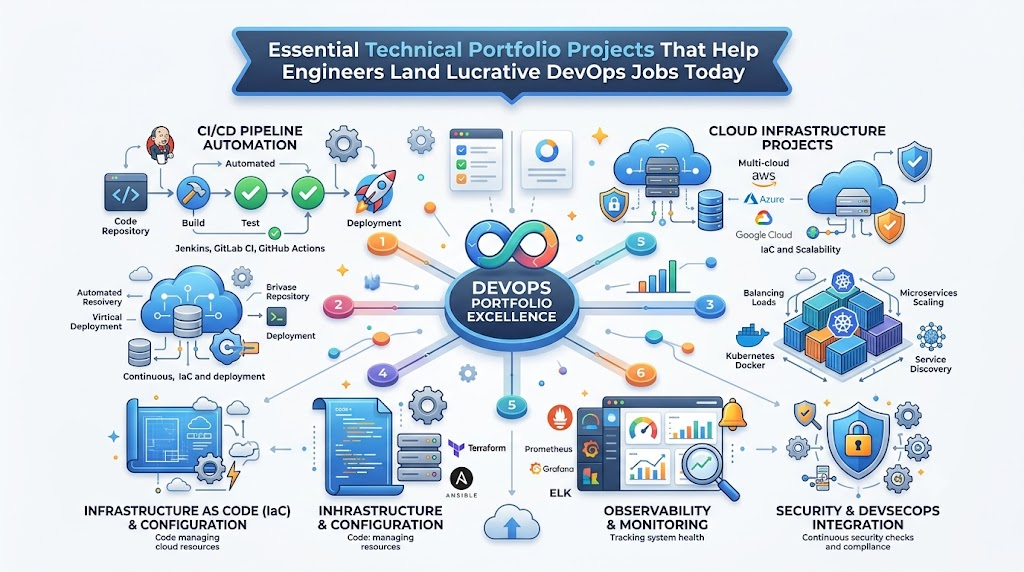
Publish your infrastructure code, automation scripts, and application manifests inside a public GitHub repository. Construct a sample project that launches a secure cloud instance and hosts a containerized app. Include clear documentation that explains your deployment steps, architectural diagrams, and trade-off choices. Hiring teams value well-documented repositories that show real technical problem-solving.
Conclusion
Navigating a modern technology path requires patience, curious exploration, and steady hands-on effort. Master foundational topics like Linux commands, Git tracking, and network connections first. Study one subject at a time so you never feel buried under complicated terminology. Test your expanding knowledge by building practical sample applications and deployment pipelines every week. Avoid chasing every new tool that pops up on social media feeds. Leverage official certification programs to validate your knowledge, but prioritize practical lab exercises above paper badges. Later in your journey, investigate Site Reliability Engineering and Platform Engineering to expand your professional options. Keep expanding your engineering capabilities by solving authentic computer problems each day.

Leave a Reply
You must be logged in to post a comment.